
By default the contents of the X-Synology-Spam-Status header are unsorted. Making it difficult to understand why a certain mail is flagged as spam or ham. Here is a tweak to sort the header by score.
Situation
Normally you can instruct rspamd to order the symbols by their score using the sort_scores setting. So the highest scoring symbols are listed first, then going down to the negative scores at the end. But because of how Synology is generating the header, the sort_scores setting has no effect. They are appended to the status message by iteration.
These instructions add a few lines of code to the generator, without interfering with the rest of the processing. The trick is to add a table.sort statement to the synology.lua script, just before the symbols are processed.
How to fix
Edit the synology.lua file:
First make sure nano is installed. It is available in the Package Center in the SynoCli File Tools package, when you add the SynoCommunity repository. Or replace the nano mentions with your favorite editor.
Open the SSH terminal with an admin user account.
sudo nano '/volume1/@appstore/MailPlus-Server/etc/rspamd/synology.lua'Now it is important to know your MailPlus Server version. You can find it in DSM → Package Center → Installed tab (left column) → Synology MailPlus Server → Installed version
Version 4.x
Find the header generator for MPS v4:
Hit CTRL W and copy-paste this line, then enter key:
for _, symbol in ipairs(smap.spam) doReplace that line with:
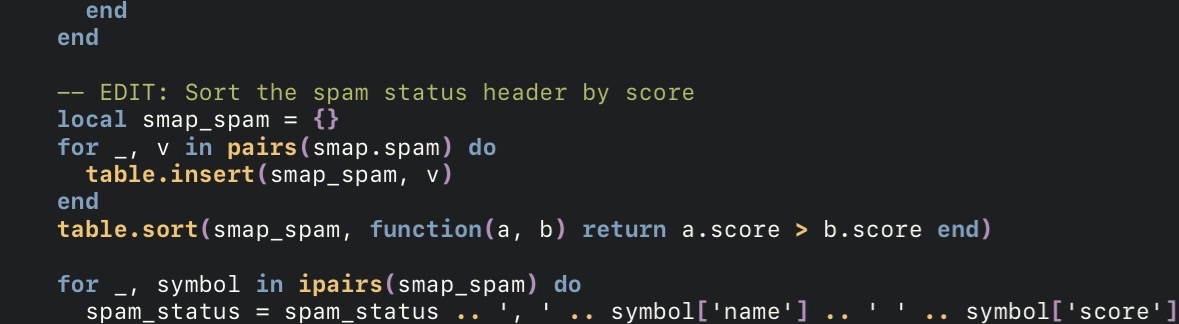
    -- EDIT: Sort the spam status header by score
    local smap_spam = {}
    for _, v in pairs(smap.spam) do
      table.insert(smap_spam, v)
    end
    table.sort(smap_spam, function(a, b) return a.score > b.score end)

    for _, symbol in ipairs(smap_spam) do
Should look like this:
Save and close the file with CTRL X, hit Y [enter]. Finally exit the terminal with exit [enter].
Version 3.x
Find the header generator for MPS v3.
Hit CTRL W and copy-paste this line, then enter key:
spam_status = spam_status .. ', ' .. symbolMove the cursor 3 lines up so it is above the for statement. Create some blank new lines to make room for the tweak.
-- EDIT: Sort the spam status header by score
table.sort(symbols, function(a, b) return a.score > b.score end)
Should look like this

Save and close the file with CTRL X, hit Y [enter]. Finally exit the terminal with exit [enter].
Notes
This is only tested on DSM 7.2.x and 7.4.x
Updating the MailPlus Server package will very likely remove this change. You have to reapply the patch after an update and the paths and code location may have changed.
Bookmark this post for later in case this happens.
Changelog
2026-09-07 – Added instructions for MPS v4